What is interpolation?
In game engines, the camera attempts to render the scene geometry as quickly as possible, which results in a variable framerate that can rise or fall at any time. On the contrary, all physics objects run on a fixed timestep. In Unity's case, that's once every 0.02 seconds, or 50 times per second. This allows the physics engine to exhibit predictable collisions between rigidbodies and keeps a steady performance.
Now, in the case that a game's player has a Rigidbody component attached to it, this poses an issue. Once again, the camera is trying to render as fast as possible, but the player's position is being updated at a different timestep. For example, if the in-game frames per second is around 100 (and the physics timestep is 50), that means that the camera is updating twice as fast as the player. This ultimately causes a jitter effect on-screen because of the inconsistency between when the camera updates and when the rigidbody updates.
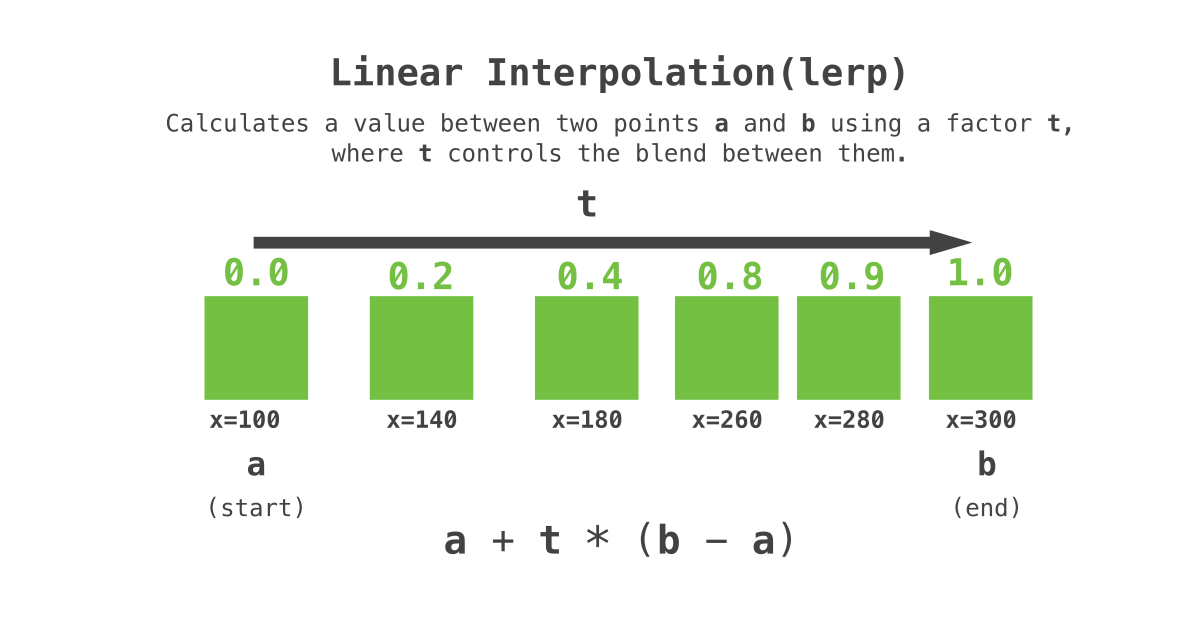
To fix this, Unity has implemented a parameter into the Rigidbody component called "interpolation," which is just a fancy way of saying "estimate value between two consecutive physics states." In this context, Unity keeps the physics position authoritative, but computes a smoothed rendered position each frame by blending between the previous and current physics states.
Although this does solve 99% of cases, there are a few times where the default interpolation implementation does not work.
Who needs this?
In my case, I'm creating a game that has portals, which rely on a lot of visual tricks to give the illusion of a real portal. For example, when you look through a portal in video games, you're actually looking at the rendered result of another camera that is placed at the exit portal to perfectly line up with your camera's perspective. Then, when you go through the portal, your player gets teleported to the exit portal with the same relative position, rotation, and velocity.
After implementing a solid portal system into my game, I noticed that the player camera would jitter when I went through it. After some research, I realized that the issue lied in the interpolation algorithm being used by the Rigidbody component. More specifically, the interpolation algorithm is not built to handle teleportation because of the following reason:
At any given physics tick, the Rigidbody's interpolation algorithm has recorded the previous position and the current position and is blending between the two every frame. When the player enters the portal, the Rigidbody's current physics position gets updated, but the interpolation algorithm still blends using the rigidbody's previous position. This is the culprit of the jitter.
Consider the following example:
Imagine we're on a 1 dimensional plane. At a given physics tick, our current position is 1.0 and our previous position was 0.0. If we have blended between the two positions by 50%, then our rendered position should be 0.5. Now imagine that the current position is suddenly updated to 10.0 on the next frame. Our interpolation algorithm still expects the blend to be at 50%, but now the rendered position become 5.0 instead of 0.5 (because 50% of the way between 0 and 10 is 5). This would make the Rigidbody look like it's flying through the world very quickly instead of actually teleporting.
How to do it
The solution I came up with has three parts:
- The interpolation that happens via the
LateUpdatefunction - The teleportation function
- The buffer inside the
FixedUpdatefunction that properly handles the teleportation
First of all, let's get our script going. This will be placed on the camera GameObject in the Unity Editor. Make sure that your camera is NOT parented to your Rigidbody. It must be a standalone GameObject.
public class InterpolatingCamera : MonoBehaviour
{
    [SerializeField] private new Rigidbody rigidbody;

    // We don't want the camera snapping to the Rigidbody's exact location,
    // so this offset allows us to control where the player's eyes are.
    [SerializeField] private Vector3 cameraPositionOffset;

    // These variables will be used for lerping
    private Vector3 previousPosition;
    private Vector3 currentPosition;

    private void OnEnable()
    {
	    // Make sure that your Rigidbody's interpolation is OFF
        this.rigidbody.interpolation = RigidbodyInterpolation.None;

		// Initialization
	    this.currentPosition = this.previousPosition = this.rigidbody.position;
    }

    private void FixedUpdate()
    {
    }

    private void LateUpdate()
    {
    }
}
The interpolation part
Now, we will be working in the FixedUpdate function first. It is called once every physics tick and allows us to record the player's previous position and current position accurately, like so:
private void FixedUpdate()
{
	// Pretty simple
	// The current position now becomes the previous position,
	// and the actual current position is the rigidbody's position
    this.previousPosition = this.currentPosition;
    this.currentPosition = this.rigidbody.position;
}
This allows us to set up our LateUpdate function to actually interpolate its movement:
private void LateUpdate()
{
    // Normalized time since last fixed update tick
    //
    // Example:
    // Time.time = 0.045
    // Time.fixedTime = 0.04
    // Time.fixedDeltaTime = 0.02 (this is the fixed timestep)
    //
    // Running this calculation gives us 0.25, meaning that we're 25% of the way until the next fixed timestep.
    var t = Mathf.Clamp01((Time.time - Time.fixedTime) / Time.fixedDeltaTime);

    // Interpolates between previous and current transformations given the normalized delta time
    // The Vector3.Lerp (Linear Interpolation) function takes in the previous positions and a value between 0-1 (which is the `t` that we calculated),
    // then it blends between the two positions based on that `t` value.
    this.transform.position = Vector3.Lerp(previousPosition, currentPosition, t) + this.cameraPositionOffset;
}
If you just wanted the custom interpolation as a template for something else, you could stop here and everything would work as normal. Once again, the biggest thing to note is that the camera should NOT be a child of the Rigidbody, which will cause undesirable jittering issues.
The teleportation part
Here's where things get slightly difficult to conceptualize. When the player teleports, we must perform some actions a few ticks into the future:
- The player teleports at
Tick 1, and the pre-teleportation position and post-teleportation position are immediately recorded. For all the frames untilTick 2, the camera interpolates between the last non-teleport position and the pre-teleport position. - At
Tick 2, the player has moved forward by one tick, so now the camera interpolates between the the previous position tick (which is the pre-teleportation position) and the player's current position. - Afterwards, the original interpolation that we wrote continues as normal. The idea of this is to skip the camera interpolating between the pre-teleportation position and post-teleportation position, which is where you would get your weird jittering artifacts as explained previously.
So, we add a new Teleport function and our FixedUpdate becomes:
// The position that the player had right before they teleported
private Vector3 preTeleportPosition;

// The position that the player will have right after they teleport
private Vector3 postTeleportPosition;

private int tick = 0;

private void FixedUpdate()
{
	// tick == 0: normal
	// tick == 1: first physics tick after teleport (hold pre-teleport)
	// tick == 2: second tick (snap buffer to post-teleport)
    switch (tick)
    {
	    case 1:
            this.previousPosition = this.currentPosition;
            this.currentPosition = this.preTeleportPosition;

	        // Go to next tick
            this.tick = 2;
			return;
        case 2:
            this.previousPosition = this.postTeleportPosition;
            this.currentPosition = this.rigidbody.position;

            // Reset ticks
            this.tick = 0;
            return;
    }

    // Normal interpolation from the last step
    this.previousPosition = this.currentPosition;
    this.currentPosition = this.rigidbody.position;
}

// Ensure that this gets called during a `FixedUpdate`, `OnCollisionEnter`, or `OnTriggerEnter` for this to work properly
public void Teleport(Vector3 position)
{
	// Set the player position
	this.preTeleportPosition = this.rigidbody.position;
	this.postTeleportPosition = position;

	this.rigidbody.position = position;

	this.tick = 1;
}
That should be it! You can call this.interpolatingCamera.Teleport(position) and it teleports the Rigidbody while maintaining a consistent interpolation.
If you have any questions, please feel free to email support@criticalanglestudios.com. Happy coding!